fireworks
Page Commands
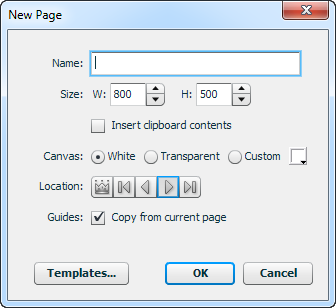
The commands in this extension make working with pages in Fireworks more efficient and convenient. The New Page dialog makes it easy to create a new page while simultaneously changing its size or background color and giving it a name. The Adjust Page Size command lets you make relative adjustments to the size of multiple pages at once, such as moving the left and right sides in by 10px on each page. Some of the commands, like Delete and Rename, replicate existing functionality but are useful if you want to assign a keyboard shortcut to that operation.
New Page dialog
To create a new page, you have to switch to the Pages panel and click the new icon. Then you have to double-click the new page to change its name. To resize it or change the background color, you have to switch the Properties panel and make the change there.
The New Page dialog centralizes all of this functionality so that you can make any necessary changes right when you add the new page. Run the Pages > New Page command to open the dialog.
At the top of the dialog you can set the name and size for the new page. By default, it will be the same size as the current page.
If you select the Insert clipboard contents option, then the contents of the clipboard will be pasted into the new page and the canvas will be resized to fit that content. This gives you a quick way to cut some elements from the current page and move them to a new one sized exactly to fit. The Width and Height fields are disabled when this option is selected, since the size will come from the clipboard contents.
The new page will default to the current page's canvas color, but you can select a white, transparent, or custom background color by clicking the radio buttons and using the color picker.
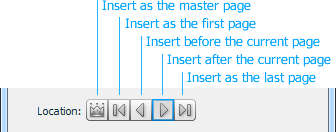
By default, the new page is inserted immediately after the current one. You can change this by selecting a different option in the Location button bar. Select the left-most button to make the new page a master page.
If the Copy from current page option for guides is selected, all of the guides from the current page will be copied to the new one, which normally is inserted without any guides.
The current page's export options are also automatically applied to the new one.
Inserting a page template
The new templates feature in Fireworks CS6 is useful for starting a new document with a pre-configured size, background color, layer structure, etc. But what if you want to use one of these templates on a new page in an existing document?
When the New Page dialog is open, you can click the Templates... button at the bottom of the dialog to select a template to insert into the new page. A file selection dialog will open to let you choose a template to insert. The new page's size and background color will be set to those of the template file, as will its name, if you hadn't specified one in the dialog. The contents and guides on the first page of the template will be imported; any subsequent pages in the template will be ignored.
Note that you aren't limited to importing only template files. You can navigate to any Fireworks document on your drive via the file selection dialog and import the document's first page.
The Templates button won't appear in versions older than Fireworks CS6.
Adjust Page Size dialog
The Canvas Size dialog lets you apply a new size to every page in the document. But if your pages are different sizes and you want to just add 100px to the bottom of every page, you'd have to change each page manually.
Making relative size adjustments
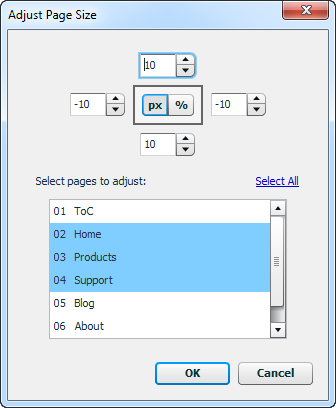
The Adjust Page Size dialog lets you make relative changes to one or more pages in your document. The four numeric fields in the upper portion of the dialog specify the amount to move each page's top, right, bottom and left sides. In the middle of that group is a control to toggle between treating the values as pixels or percentages.
A negative value in a numeric field will cause that side of the page to move in towards the center of the page, while a positive value will push it out. For instance, if you enter -10 in the bottom field and the units selector is set to px, then the bottom edge of the page will move up 10px, reducing its height. On the other hand, if you enter 10 in the top field, 10px of extra space will be added to the top of the page.
If the units selector is set to percent, then the amount by which each side of the page is adjusted will depend on the page's height (for top and bottom) and width (for left and right). This lets you, say, expand each page by 25% on the left and right sides, which will translate into a 300px increase for a 600px-wide page and a 400px increase for an 800px-wide page.
When a numeric field has keyboard focus, pressing up/down-arrow will adjust the values by 1 in either direction and pressing shift-up/down-arrow will adjust it by 10 in either direction.
Selecting pages to resize
The lower portion of the Adjust Page Size dialog lists the pages in the current document. The current one is selected by default, but you can select any combination of pages to apply the size changes to. Just ctrl/command-click multiple pages to pick individual ones, or click the Select All link to select the whole document.
More page commands
The other commands in the extension include:
- Distribute Frames to Pages
- This command moves the content from each frame in a document to a new page, named the same as the frame.
- Distribute Layers to Pages
- This command moves each top-level layer on the current page to a new page, named the same as the layer. The original page is left intact.
- Import Files into Pages
- This command is useful for combining several existing files as pages in a new document. When the command is run, it displays a dialog in which you can select the files you want to combine. Select one or more PNG files and click OK. A new document will be created and each file will be imported into a new page that has the same dimensions as the original file. Note that because Fireworks requires layer names to be unique across pages, the layers from the source files may be renamed.
- Apply Export Settings to All Pages
- This command takes the export settings on the current page and applies them to all pages in the document.
- Crop All Pages to Selection
- This command makes it easy to apply the same cropping area to all pages in the document. To specify the crop area, select some elements whose bounding box will be used for the crop, or else make a selection with the bitmap marquee tool. When you then run the command, all the pages will be cropped to that area.
- Go to <1 - 10>
- These commands are useful for creating keyboard shortcuts to jump directly to the first through tenth pages. Go to First jumps to the first page in the document, and Go to Last jumps to the last.
Release history:
- 0.4.1
- 2013-09-22: Fixed a bug in the Distribute Layers to Pages command.
- 0.4.0
- 2013-03-08: Added New Page and Adjust Page Size commands.
- 0.3.0
- 2012-07-13: Distribute Frames to Pages now supports sublayers. Added Distribute Layers to Pages command.
- 0.2.3
- 2010-02-20: Added Crop All Pages to Selection command.
- 0.2.2
- 2009-02-22: Revamped JS code so it wouldn't interfere with other commands.
- 0.2.1
- 2008-10-07: Fixed a stray alert() in layers_1.5.js.
- 0.2.0
- 2008-10-07: Fixed issues with visibility state of layers not being copied between pages. Maintain frame info when applying export settings to all pages. Allow any image type to be imported into pages.
- 0.1.0
- 2007-03-17: Initial release.
Package contents
- Adjust Page Size
- Apply Export Settings to All Pages
- Crop All Pages to Selection
- Delete
- Distribute Frames to Pages
- Distribute Layers to Pages
- Duplicate
- Go to 1
- Go to 2
- Go to 3
- Go to 4
- Go to 5
- Go to 6
- Go to 7
- Go to 8
- Go to 9
- Go to 10
- Go to First
- Go to Last
- Import Files into Pages
- New Page
- Rename
- JSMLDialog